





 Activities
Mind map
A mind map is useful when you want to gather and organize ideas, show connections between concepts, or allow students to explore a topic visually.
Nodes
A mind map consists of nodes that represent elements or ideas. Nodes can be connected to show relationships between the elements or ideas.
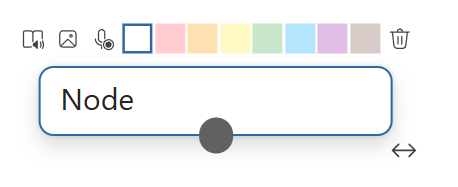
To each node, you can add text, an image, and an audio recording, in addition to giving each node a color. The text can also be made more accessible with immersive reader.
Add a Mind map
- Open the activity.
- Select Add (+) at the bottom right.
- Select Mind map.
The Mind map is only visible to the teacher until it is handed out. Select Hand out to give the mind map to all or selected students. Once the Mind map is handed out, students can continue working on it when they have Active access to the activity.
Hand out a Mind map with content
As a teacher, you can build the Mind map before handing it out. Start with a topic and add nodes to organize ideas and show connections. You can also add audio recordings to nodes to provide oral explanations, comments, or reflections.
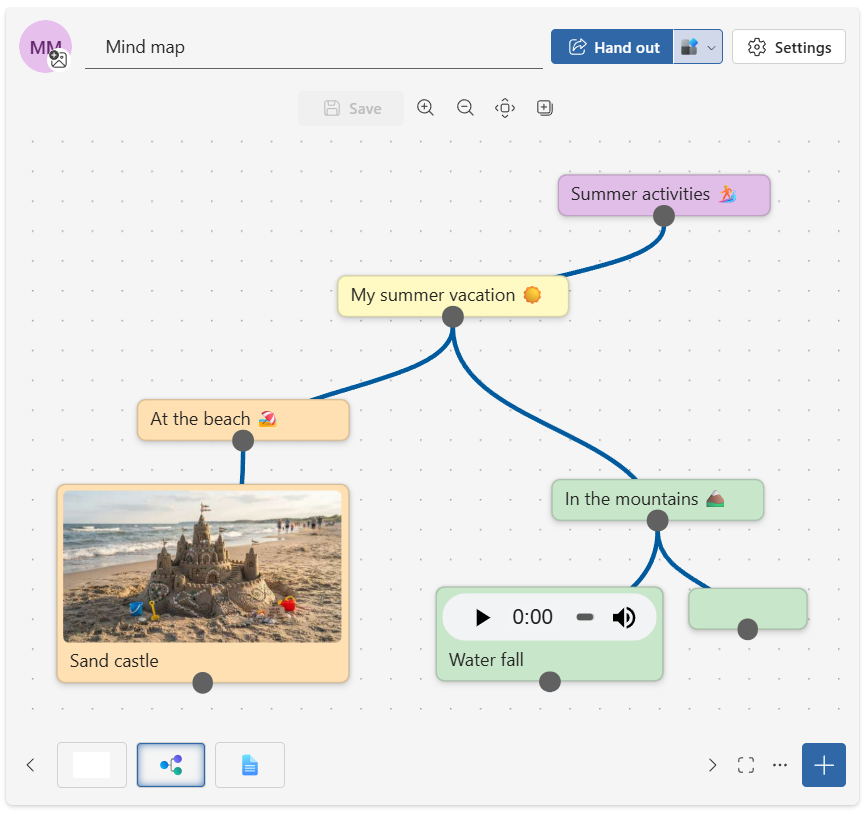
Once the Mind map is ready, hand it out to the students. With read-only access, they can read and listen to the content, while Active access allows students to edit the mind map.
Explore Together
When students are placed in the same group in an activity, the pages become the group's collaborative areas that everyone can edit. This means that students in the same group can work on the same mind map.
Note: When multiple students work simultaneously in the same group, conflicts may arise if they edit the same part of the mind map at the same time. It may therefore be wise to divide different parts of the mind map among the students.