





 Activities
Audio recording in an activity
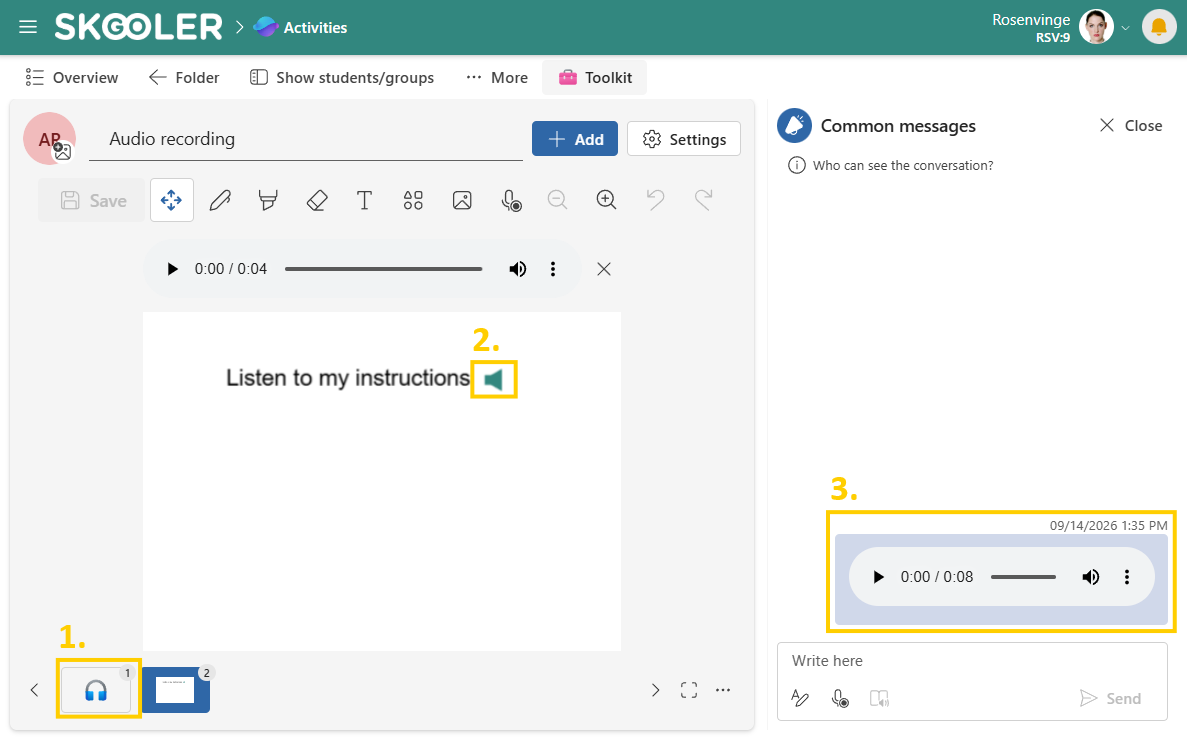
Audio recording makes it easy to share information, give verbal instructions, and communicate with students. Students can also use the options below when their access to the activity is set to active.
In an activity, you can add audio recordings in different ways:
- Add a page with an audio recording
- Add audio recording to a sheet
- Send an audio recording in the learning dialogue
- Add audio recording to a mind map
Note: If the browser or device asks for access to the microphone, you must select Allow to be able to record audio.
1. Add a page with an audio recording
Create a separate page with an audio recording when you want to present a topic, share information, or provide a verbal explanation.
- Select Add (+) at the bottom right corner of the activity.
- Select Audio Recording.
- Start the recording. You can pause and resume the recording as needed.
- Play, listen to the recording, and select Save.
- The audio recording becomes a separate page in the activity.
- Teacher: Hand out the page with the audio recording to the students.
2. Add audio recording to a sheet
On a sheet, audio recordings can be used alongside text, images, and other elements. For example to provide verbal instructions in addition to text, or allow the students to record reading aloud or their own reflections. You can add multiple audio recordings to the same sheet.
- Add or select a sheet, and select the Audio Recording icon from the toolbar.
- Start the recording. You can pause and resume the recording as needed.
- Play, listen to the recording, and select Add (+).
- Place the audio recording where you want it on the sheet.
- Select Save to save the audio recording on the sheet.
- Teacher: Hand out the sheet with the audio recording to the students.
3. Send an audio recording in the learning dialogue
In the learning dialogue, teachers and students can use audio recordings for verbal feedback, questions, and follow-up. An audio recording can also be sent as a common message by teachers.
- In a conversation or common message, select the Audio Recording icon.
- Start the recording. You can pause and resume the recording as needed.
- Play, listen to the recording, and select Send.
- The audio recording is sent in the conversation.
4. Add audio recording to a mind map
On a mind map, audio recordings can be used to provide verbal explanations, comments, or reflections related to different nodes.
- On a mind map, add or select a node, and then select the Audio Recording icon from the toolbar.
- Start the recording. You can pause and resume the recording as needed.
- Play, listen to the recording, and select Add (+).
- Select Save to save the audio recording in the mind map.
- Teacher: Hand out the mind map with the audio recording to the students.
The recorder
The recorder is used to record audio. The buttons on the recorder have the following functions:
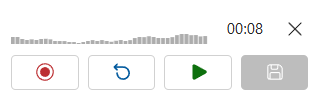
- Start, pause, and resume the recording
- Start a new recording, the old recording will be replaced
- Play and listen to the recording
- Save/add/send the recording