




'%20d='M1.91%207.38A8.5%208.5%200%200%201%203.7%204.3a.5.5%200%200%201%20.54-.13l1.92.68a1%201%200%200%200%201.32-.76l.36-2a.5.5%200%200%201%20.4-.4%208.5%208.5%200%200%201%203.55%200c.2.04.35.2.38.4l.37%202a1%201%200%200%200%201.32.76l1.92-.68a.5.5%200%200%201%20.54.13%208.5%208.5%200%200%201%201.78%203.08c.06.2%200%20.4-.15.54l-1.56%201.32a1%201%200%200%200%200%201.52l1.56%201.32a.5.5%200%200%201%20.15.54%208.5%208.5%200%200%201-1.78%203.08.5.5%200%200%201-.54.13l-1.92-.68a1%201%200%200%200-1.32.76l-.37%202a.5.5%200%200%201-.38.4%208.5%208.5%200%200%201-3.56%200%20.5.5%200%200%201-.39-.4l-.36-2a1%201%200%200%200-1.32-.76l-1.92.68a.5.5%200%200%201-.54-.13%208.5%208.5%200%200%201-1.78-3.08.5.5%200%200%201%20.15-.54l1.56-1.32a1%201%200%200%200%200-1.52L2.06%207.92a.5.5%200%200%201-.15-.54M8%2010a2%202%200%201%200%204%200%202%202%200%200%200-4%200'/%3e%3cdefs%3e%3clinearGradient%20id='a'%20x1='14.06'%20x2='4.53'%20y1='17.84'%20y2='3.07'%20gradientUnits='userSpaceOnUse'%3e%3cstop%20stop-color='%2370777d'/%3e%3cstop%20offset='1'%20stop-color='%23b9c0c7'/%3e%3c/linearGradient%3e%3c/defs%3e%3c/svg%3e) Administration
AdministrationILP templates
Administrators can create and delete ILP templates in the entire organization.
Manager can create ILP templates for their own school and can only delete the templates they create themselves.
Templates that are in use will be available for use by everyone in the organization. You can use templates created by others by selecting your school within the template. When a template is used by the teachers at a school you will no longer be able to edit the ILP template. This is indicated with a padlock icon.
A template is in use for the teachers at your school when your school is selected within the template. In the list of ILP templates, you will see which schools that are selected and which templates that are locked and no longer editable.
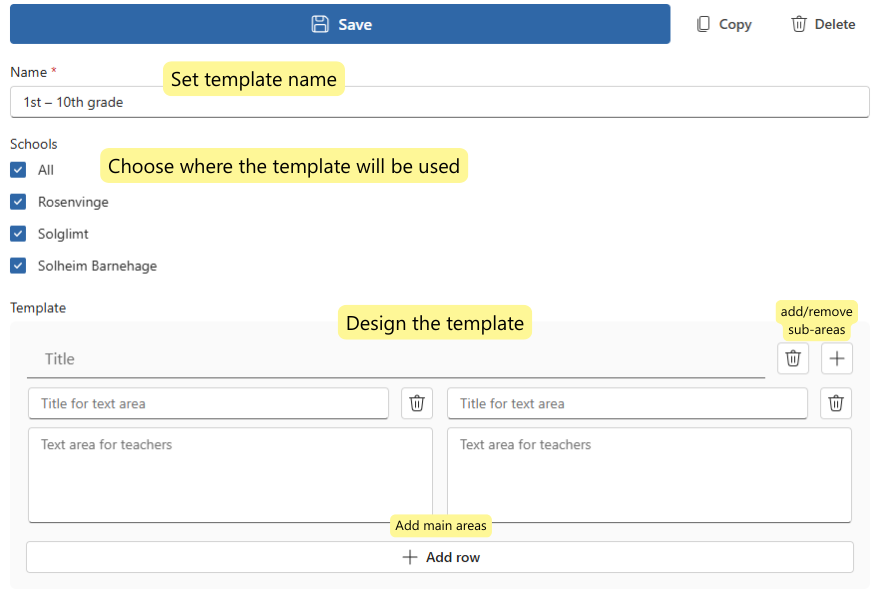
Create new ILP template
When creating an ILP template, you must decide on the name of the template and which schools the template will be used for. Design the template by selecting main areas/rows and desired sub-areas. Fill in Title for the main areas and title for text area. In text area for teachers, a standard text or guiding text can be added that teachers can use as a starting point when filling out the ILP for a student.