





'%20d='M1.91%207.38A8.5%208.5%200%200%201%203.7%204.3a.5.5%200%200%201%20.54-.13l1.92.68a1%201%200%200%200%201.32-.76l.36-2a.5.5%200%200%201%20.4-.4%208.5%208.5%200%200%201%203.55%200c.2.04.35.2.38.4l.37%202a1%201%200%200%200%201.32.76l1.92-.68a.5.5%200%200%201%20.54.13%208.5%208.5%200%200%201%201.78%203.08c.06.2%200%20.4-.15.54l-1.56%201.32a1%201%200%200%200%200%201.52l1.56%201.32a.5.5%200%200%201%20.15.54%208.5%208.5%200%200%201-1.78%203.08.5.5%200%200%201-.54.13l-1.92-.68a1%201%200%200%200-1.32.76l-.37%202a.5.5%200%200%201-.38.4%208.5%208.5%200%200%201-3.56%200%20.5.5%200%200%201-.39-.4l-.36-2a1%201%200%200%200-1.32-.76l-1.92.68a.5.5%200%200%201-.54-.13%208.5%208.5%200%200%201-1.78-3.08.5.5%200%200%201%20.15-.54l1.56-1.32a1%201%200%200%200%200-1.52L2.06%207.92a.5.5%200%200%201-.15-.54M8%2010a2%202%200%201%200%204%200%202%202%200%200%200-4%200'/%3e%3cdefs%3e%3clinearGradient%20id='a'%20x1='14.06'%20x2='4.53'%20y1='17.84'%20y2='3.07'%20gradientUnits='userSpaceOnUse'%3e%3cstop%20stop-color='%2370777d'/%3e%3cstop%20offset='1'%20stop-color='%23b9c0c7'/%3e%3c/linearGradient%3e%3c/defs%3e%3c/svg%3e) Administration
AdministrationMessages
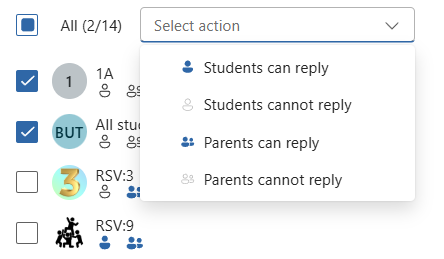
From Messages in Administration, you can change whether students and parents can reply to messages in multiple class groups simultaneously. The class groups where students and parents can and cannot reply are shown in the list.
Class groups by role
The selection of class groups you can change response options for depends on your role:
- Teacher: Class groups you are associated with.
- Manager: All class groups at the school.
- Administrator: All class groups in the organization.
Change response options
- Select one, several, or all class groups in the list.
- Open Select action.
- Select the response option, you can only choose one option at a time.
- Students can reply
- Students cannot reply
- Parents can reply
- Parents cannot reply