




'%20d='m8.46%201.9.99.39c.35.14.74.14%201.1%200l.99-.4c1.2-.47%202.58.1%203.1%201.3l.42.97c.15.35.43.62.78.77l.98.43c1.19.52%201.76%201.89%201.28%203.1l-.39%201a1.5%201.5%200%200%200%200%201.09l.39.99a2.42%202.42%200%200%201-1.29%203.1l-.97.43a1.5%201.5%200%200%200-.78.77l-.42.98a2.42%202.42%200%200%201-3.1%201.28l-1-.39a1.5%201.5%200%200%200-1.1%200l-.98.4a2.42%202.42%200%200%201-3.1-1.3l-.43-.97a1.5%201.5%200%200%200-.77-.77l-.98-.43a2.42%202.42%200%200%201-1.28-3.1l.38-.99a1.5%201.5%200%200%200%200-1.1l-.38-.99a2.42%202.42%200%200%201%201.28-3.1l.98-.43c.34-.15.62-.42.77-.77l.43-.98a2.42%202.42%200%200%201%203.1-1.28'/%3e%3cpath%20fill='url(%23b)'%20fill-opacity='.7'%20d='m8.46%201.9.99.39c.35.14.74.14%201.1%200l.99-.4c1.2-.47%202.58.1%203.1%201.3l.42.97c.15.35.43.62.78.77l.98.43c1.19.52%201.76%201.89%201.28%203.1l-.39%201a1.5%201.5%200%200%200%200%201.09l.39.99a2.42%202.42%200%200%201-1.29%203.1l-.97.43a1.5%201.5%200%200%200-.78.77l-.42.98a2.42%202.42%200%200%201-3.1%201.28l-1-.39a1.5%201.5%200%200%200-1.1%200l-.98.4a2.42%202.42%200%200%201-3.1-1.3l-.43-.97a1.5%201.5%200%200%200-.77-.77l-.98-.43a2.42%202.42%200%200%201-1.28-3.1l.38-.99a1.5%201.5%200%200%200%200-1.1l-.38-.99a2.42%202.42%200%200%201%201.28-3.1l.98-.43c.34-.15.62-.42.77-.77l.43-.98a2.42%202.42%200%200%201%203.1-1.28'/%3e%3cpath%20fill='url(%23c)'%20fill-opacity='.9'%20d='M8%207a2%202%200%201%201%204%200%202%202%200%200%201-4%200m-.5%203h5c.82%200%201.5.67%201.5%201.5%200%201.11-.47%202-1.22%202.61-.74.6-1.73.89-2.79.89a4.43%204.43%200%200%201-2.79-.89A3.25%203.25%200%200%201%206%2011.5c0-.83.66-1.5%201.5-1.5'/%3e%3cdefs%3e%3clinearGradient%20id='a'%20x1='4.48'%20x2='12.75'%20y1='.81'%20y2='19.19'%20gradientUnits='userSpaceOnUse'%3e%3cstop%20stop-color='%231ec8b0'/%3e%3cstop%20offset='1'%20stop-color='%232764e7'/%3e%3c/linearGradient%3e%3clinearGradient%20id='b'%20x1='12.56'%20x2='15.84'%20y1='3.76'%20y2='20.05'%20gradientUnits='userSpaceOnUse'%3e%3cstop%20offset='.53'%20stop-color='%23ff6ce8'%20stop-opacity='0'/%3e%3cstop%20offset='1'%20stop-color='%23ff6ce8'/%3e%3c/linearGradient%3e%3clinearGradient%20id='c'%20x1='16'%20x2='-1.56'%20y1='23.57'%20y2='-2.19'%20gradientUnits='userSpaceOnUse'%3e%3cstop%20stop-color='%239deaff'/%3e%3cstop%20offset='1'%20stop-color='%23fff'/%3e%3c/linearGradient%3e%3c/defs%3e%3c/svg%3e) ILP
ILPILP periods
When working with an ILP, you can publish and end the period, make changes, or archive the plan and start a new period. Below we explain what the different options entail.
Publish and end the period
An ILP period ends when the ILP is published and made visible to the student and parents. The period then gets an end date corresponding to the publication date.
You can continue the period by selecting Edit. When the ILP is republished, the end date is updated to the date of the latest publication.
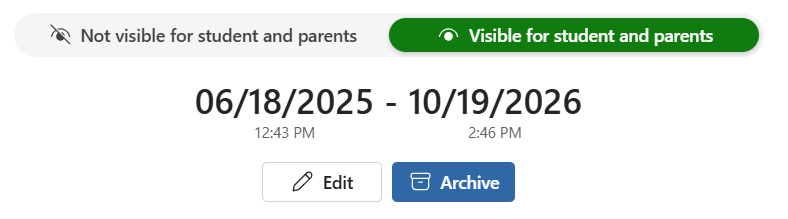 The ILP is published, the period has ended and has an end date. You can edit and continue the period, or archive it at a later time.
Edit and continue the period
You can make changes to a published ILP. When you select Edit, the period continues until the ILP is republished. While the ILP is being edited, it is not visible to the student or parents.
When you edit a published ILP, the indicator showing whether the student or parents have viewed the ILP is reset.
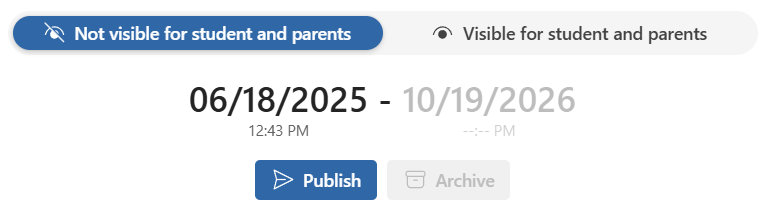 The period has not ended, the ILP can be edited. The ILP is not visible to the student or parents.
Archive and start a new period
To archive an ILP, it must first be published and visible to the student and parents. Archiving starts the next period. The next period continues from the end date of the previous period.
Note: An archived ILP can no longer be edited.
Previous periods
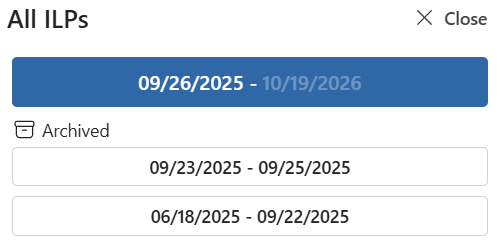
You can find previous periods under Archived in the All ILPs overview. At the top of the overview, the current or most recently published period is displayed.