





'%20d='M10%202a8%208%200%201%201-3.61%2015.14l-.12-.07-3.65.92a.5.5%200%200%201-.62-.45v-.08l.01-.08.92-3.64-.07-.12a8%208%200%200%201-.83-2.9l-.02-.37L2%2010a8%208%200%200%201%208-8'/%3e%3cpath%20fill='url(%23b)'%20d='M10.5%2011H7.41a.5.5%200%200%200%200%201h3.18a.5.5%200%200%200%200-1zm2-3H7.41a.5.5%200%200%200%200%201h5.18a.5.5%200%200%200%200-1z'/%3e%3cdefs%3e%3clinearGradient%20id='a'%20x1='2.57'%20x2='16.54'%20y1='5'%20y2='28.82'%20gradientUnits='userSpaceOnUse'%3e%3cstop%20stop-color='%230fafff'/%3e%3cstop%20offset='1'%20stop-color='%23cc23d1'/%3e%3c/linearGradient%3e%3clinearGradient%20id='b'%20x1='7.52'%20x2='7.97'%20y1='8.07'%20y2='12.41'%20gradientUnits='userSpaceOnUse'%3e%3cstop%20stop-color='%23fdfdfd'/%3e%3cstop%20offset='1'%20stop-color='%23cceaff'/%3e%3c/linearGradient%3e%3c/defs%3e%3c/svg%3e) Messages
MessagesAbout Messages
Send and receive messages where the rest of the learning takes place.
Message
Messages can be sent to students and parents from a class group. Teachers linked to the same class group will be able to see and write messages in the group, and will have access to the message history sent to and from the group.
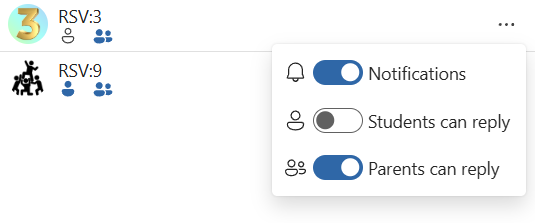
Decide per class group whether:
- students and parents should be able to reply to messages.
- you want notifications for messages in the relevant class group.
School message
School messages are used by managers and administrators to send important announcements from the school.
- Managers can send school messages to their own school. Administrators can send school messages to all schools in the organization.
- School messages cannot be replied to by the recipients.
Sending a message or school message
- Select + New message or + New school message
- Select recipient(s)
- Write the message, add an audio recording or attachment
- Send
Note: Do not write sensitive information in messages or school messages.
Drafts
- If you have started a message and leave the page, the message with selected recipients and content will automatically be saved under drafts.
- You can return to your drafts at any time to edit, complete, and send them.
Messages in Administration
From Administration, teachers, managers, and administrators can set, for multiple class groups simultaneously, whether students and parents should be able to reply to messages or not.